Best practices of
Software Engineering
Last
updated: Feb. 23, 2006
Objectives:
-
Identify symptoms of
software development problems.
-
Explain the Best
Practices.
-
Present the Rational
Unified Process (RUP) within the context of the Best Practices.
Symptoms
of Software Development Problems:
-
User or business needs
not met
-
Requirements not
addressed
-
Modules not
integrating
-
Difficulties with
maintenance
-
Late discovery of
flaws
-
Poor quality of
end-user experience
-
Poor performance under
load
-
No coordinated team
effort
-
Build-and-release
issues
Trace
Symptoms to Root Causes:
| Symptoms |
Root Causes |
Best practices |
| Needs not met Requirements churn
Modules do not fitHard to maintain
Late discoveryPoor quality
Poor performanceColliding developers
Build-and-release |
Insufficient requirements Ambiguous communications
Brittle architecturesOverwhelming complexity
Undetected inconsistenciesPoor testing
Subjective assessmentWaterfall development
Uncontrolled changeInsufficient automation |
Develop Iteratively Manage Requirements
Use Component ArchitecturesModel Visually (UML)
Continuously Verify QualityManage Change |
Best
Practices Reinforce Each Other:
-
In the case of our
Best Practices, the whole is much greater than the sum of the parts. Each of
the Best Practices reinforces and, in some cases, enables the others.
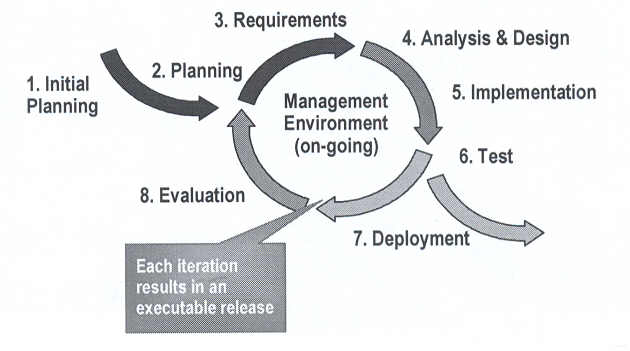
Develop
Iteratively:
Manage
Requirements:
Use
Component Architectures:
| Component-based |
Resilient |
- Reuse or customize components
- Select from commercially available components
- Evolve existing software incrementally
|
- Meets current and future requirements
- Encapsulates system dependencies
|
- Purpose of a
Component-Based Architecture:
- Basis for reuse
- Component reuse
- Architecture reuse
- Basis for project management
- Planning
- Staffing
- Delivery
- Intellectual control
- Manage complexity
- Maintain integrity
Model Visually (Unified
Modeling Language, UML):
- Captures structure and behavior
- Shows how system elements fit
together
- Keeps design and implementation consistent
- Hides or exposes details as
appropriate
- Promotes unambiguous communication
- The UML provides one language for all practitioners.
- The UML provides a rich
notation for visualizing models. This includes the following key
diagrams:
- Use-case diagrams: to
illustrate user interactions with the system
- Class diagrams: to
illustrate logical structure
- Object diagrams: to
illustrate objects and links
- Component diagrams: to
illustrate physical structure of the software
- Deployment diagrams: to
show the mapping of software to hardware configurations
- Activity diagrams: to
illustrate flows of events
- State Machine diagrams: to
illustrate behavior
- Interaction diagrams (that
is, Communication and Sequence diagrams): to illustrate behavior
Continuously Verify
Quality:
- It is a lot less expensive to
correct defects during development than to correct them after deployment.
- Testing Dimensions
of Quality:
- Functionality:
Test the accurate workings
of each usage scenario.
- Usability:
Test application from the
perspective of convenience to the end user.
-
Reliability: Test that the application behaves consistently and
predictably.
-
Performance: Test the online response under average and peak
loading.
-
Supportability: Test the ability to maintain and support the
application under production use.
Manage Change:
- To avoid
confusion, have:
- Secure workspaces for each
developer
- Automated integration/build
management
- Parallel development
- A key challenge to developing
software-intensive systems is the need to cope with multiple developers,
organized into different teams, possibly at different sites, all working
together on multiple iterations, releases, products, and platforms. Three
common problems that result are:
- Simultaneous
update: When two or more
roles separately modify the same artifact, the last one to make changes
destroys the work of the others.
- Limited
notification: When a problem is fixed in shared artifacts, some
of the developers are not notified of the change.
- Multiple
versions: With iterative development, it would not be unusual to
have multiple versions of an artifact in different stages of development
at the same time.
- Unified Change
Management (UCM) involves:
- Management across the
lifecycle
- System
- Project management
- Activity-based management
- Tasks
- Defects
- Enhancements
- Progress tracking
Rational Unified
Process (RUP) Implements Best Practices:
- Why have a
process?
- It provides guidelines for
efficient development of quality software
- It reduces risk and increases
predictability
- It promotes a common vision
and culture
- It captures and
institutionalizes Best Practices
- The RUP
is a generic business process for object-oriented software engineering. It
describes a family of related software-engineering processes sharing a
common structure and a common process architecture. It provides a
disciplined approach to assigning tasks and responsibilities within a
development organization. Its goal is to ensure the production of high-quality software that meets the needs of its end users within a predictable
schedule and budget. The RUP captures the Best Practices in modern software
development in a form that can be adapted for a wide range of projects and
organizations.
- The UML provides a standard for
the artifacts of development (semantic models, syntactic notation, and
diagrams): the things that must be controlled and exchanged. But the UML is
not a standard for the development process. Despite all of the value that a
common modeling language brings, you cannot achieve successful development
of today's complex systems solely by the use of the UML. Successful
development also requires employing an equally robust development process,
which is where the RUP comes in.
- Achieving Best
Practices:
- Iterative approach
- Guidance for activities and
artifacts
- Process focus on architecture
- Use cases that drive design
and implementation
- Models that abstract the
system
- Examples:
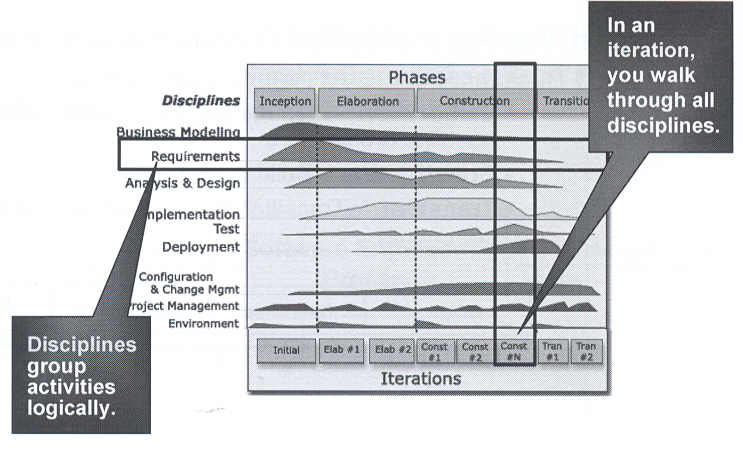
- The dynamic structure
(phases and iterations) of the RUP creates the
basis of iterative development.
- The Project Management
discipline describes how to set up and execute a project using phases
and iterations.
- Within the Requirements
discipline, the Use-case model and the risk list determine what
functionality you implement in an iteration.
- The workflow details of
the Requirements discipline show the activities and artifacts that
make requirements management possible.
- The iterative approach
allows you to progressively identify components and to decide which
one to develop, which one to reuse, and which one to buy.
- The UML used in the process represents the basis of visual
modeling and has become the de facto modeling language standard.
- The focus on software
architecture allows you to articulate the structure: the components,
the ways in which they integrate, and the fundamental mechanisms and
patterns by which they interact.
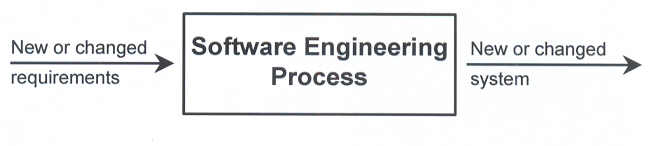
- A Team-Based
Definition of Process:
- A Process defines
Who is doing
What, When, and
How, in order to reach a certain goal.
- Process
Structure-Lifecycle Phases:
- The RUP has
four phases:
-
Inception: Define the scope of the project
-
Elaboration: Plan the project; specify features and baseline
architecture
-
Construction: Build the product
-
Transition: Transition the product into the end-user
community

- The RUP
disciplines:
- Business
Modeling: Encompasses all
modeling techniques you can use to visually model a business.
-
Requirements: Defines what the system should do.
- Analysis
& Design: Shows how the system's use cases will be realized in
implementation.
-
Implementation: Implements software components that meet quality
standards.
- Test:
Integrates and tests the system.
-
Deployment: Provides the software product to the end-user.
-
Configuration & Change Management: Controls and tracks changes to
artifacts.
- Project
Management: Ensures tasks are scheduled, allocated and completed
in accordance with project schedules, budgets and quality requirements.
-
Environment: Defines and manages the environment in which the
system is being developed.
Summary:
- Best Practices guide software
engineering by addressing root causes.
- Best Practices reinforce each
other.
- Process guides a team on who does
what, when, and how.
- The Rational Unified Process is a
means of achieving Best Practices.