Last updated: Mar. 08, 2006
What Is Generalization?
Generalization: A specialization/generalization relationship in which objects of the specialized element (the child) are substitutable for objects of the generalized element (the parent).
The subclass may be used where the superclass is used, but not vice versa.
The child inherits from the parent.
Generalization is transitive. You can always test your generalization by applying the "is a kind of" rule. You should always be able to say that your specialized class "is a kind of" the parent class.
The terms "generalization" and "inheritance" are generally interchangeable. If you need to distinguish, generalization is the name of the relationship, while inheritance is the mechanism that the generalization relationship represents/models.
Inheritance: The mechanism by which more-specific elements incorporate the structure and behavior of more-general elements.
Single inheritance: The subclass inherits from only one superclass (has only one parent).
Multiple inheritance: The subclass inherits from more than one superclass (has multiple parents).
Dependency:
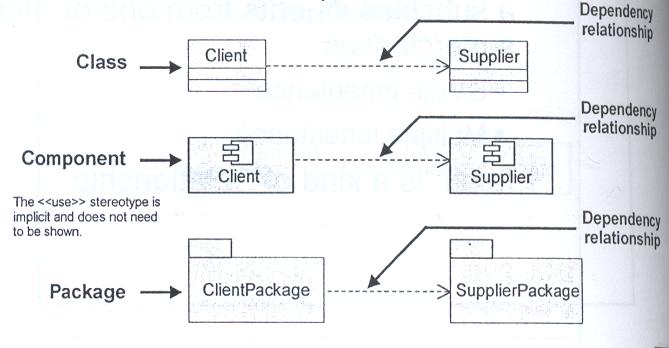
A dependency relationship is a weaker form of relationship showing a relationship between a client and a supplier where the client does not have semantic knowledge of the supplier.
A dependency relationship denotes a semantic relationship between model elements, where a change in the supplier may cause a change in the client.
Realization:
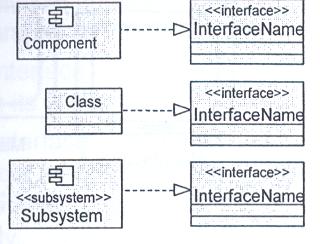
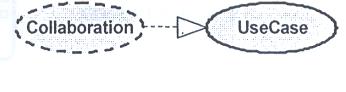
Realization is a semantic relationship between two classifiers. One classifier serves as the contract that the other classifier agrees to carry out.
The realizes relationship is a combination of a dependency and a generalization. It is not true generalization, as only the "contract" (that is to say, operation signature) is "inherited." This "mix" is represented in its UML form, which is a combination of dependency and generalization.
Found between:
Interfaces and the classifiers that realize them
- Use cases and the collaborations that realize them
What Is Polymorphism?
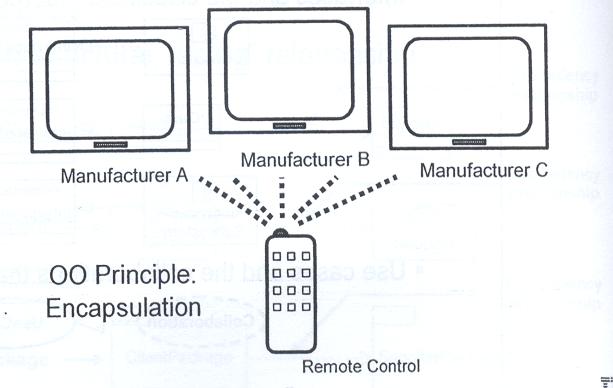
The Greek term polymorphos means "having many forms." There may be one or many implementations of a given interface. Every implementation of an interface must fulfill the requirements of that interface. In some cases, the implementation can perform more than the basic interface requirements.
For example, the same remote can be used to control any type of television (implementation) that supports the specific interface that the remote was designed to be used with.
What Is an Interface?
Interfaces are the key to the "plug-and-play" ability of an architecture: Any classifiers (for example, classes, subsystems, components) that realize the same interfaces may be substituted for one another in the system, thereby supporting the changing of implementations without affecting clients.
Interfaces formalize polymorphism. They allow us to define polymorphism in a declarative way, unrelated to implementation. Two elements are polymorphic with respect to a set of behaviors if they realize the same interfaces. In other words, if two objects use the same behaviors to get different, but similar results, they are considered to be polymorphic. A cube and a pyramid can both be drawn, moved, scaled, and rotated, but they look very different.
You have probably heard that polymorphism is one of the big benefits of object orientation, but without interfaces there is no way to enforce it, verify it, or even express it except in informal or language-specific ways. Formalization of interfaces strips away the mystery of polymorphism and gives us a good way to describe, in precise terms, what polymorphism is all about. Interfaces are testable, verifiable, and precise.
A contract between providers and consumers of services.
Examples of interfaces:
Provided interface: The interfaces that the element exposes to its environment.
Required interface: The interfaces that the element requires from other elements in its environment in order to be able to offers its full set of provided functionality.
A Provided Interface Example:
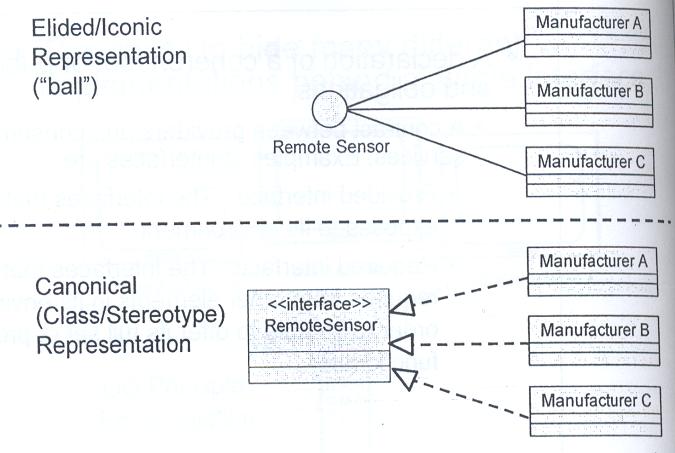
The ball notation is best used when you only need to denote the existence of an interface. If you need to see the details of the interface (for example, the operations), then the class/stereotype representation is more appropriate.
A Required Interface Example:
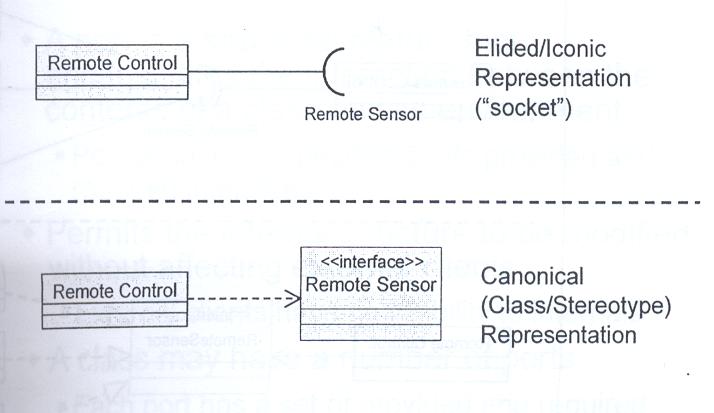
The socket notation is best used when you only need to denote the existence of an interface. If you need to see the details of the interface (for example, the operations), then the class/stereotype representation is more appropriate.
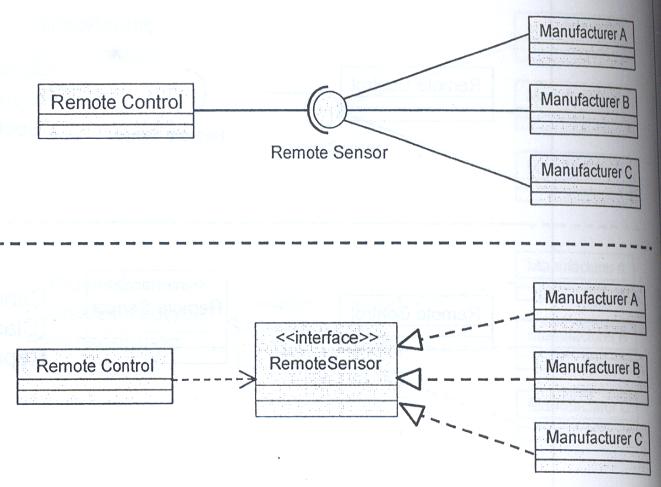
Example: Connecting Interfaces
What Is a Port?
A port is a structural feature that encapsulates the interaction between the contents of a class and its environment.
Port behavior is specified by its provided and required interfaces.
Permits the internal structure to be modified without affecting external clients
External clients have no visibility to internals
A class may have a number of ports
Each port has a set of provided and required interfaces
Since the port is a structural element, it's created and destroyed along with its structured class.
Another class connected to a port may request the provided services from the owner of the port but must also be prepared to supply the required services to the owner.
Port notation:
A port is shown as a small square with the name placed nearby.
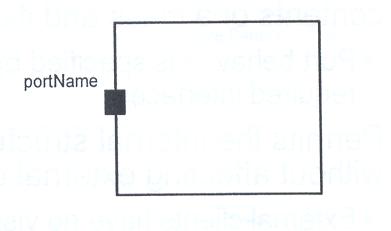
Ports may be public, protected or private
Ports types:
Ports can have different implementation types:
Service Port : Is only used for the internal implementation of the class
Behavior Port : Requests on the port are implemented directly by the class
Relay Port : Requests on the port are transmitted to internal parts for implementation
The use of service ports are rare because the main purpose of ports is to encapsulate communication with the environment. These ports are located inside the class boundary.
Behavior ports are shown by a line from the port to a small state symbol (a rectangle with rounded corners).
Example: Structure Diagram with Ports
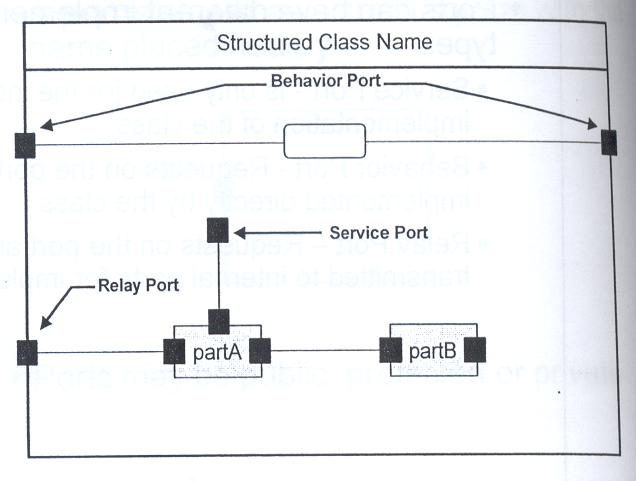
Diagram Depiction:
Each diagram has a frame, a heading compartment in the upper left corner, and a contents area.
If the frame provides no additional value, it may be omitted and the border of the diagram area provided by the tool will be the implied frame.
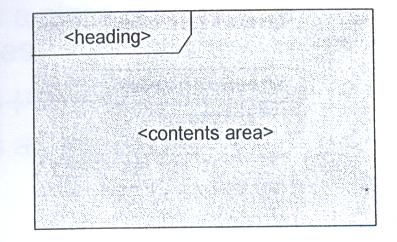
A heading compartment is a string contained in a name tag (a rectangle with cutoff corner) in the upper leftmost corner with the following syntax:
[<kind>]<name>[<parameters>]
This <kind> can be:
activity: activity diagram
package: class diagram, package diagram
communication: communication diagram
component: component diagram
class: composite structure diagram
deployment: deployment diagram
intover: interaction overview diagram
object: object diagram
state machine: state machine diagram
sd: sequence diagram
timing: timing diagram
use case: use case diagram
What Are Notes?
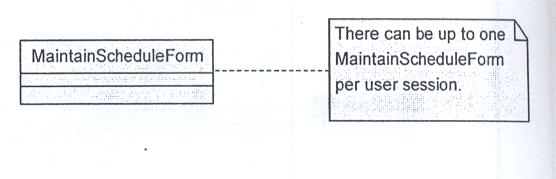
A comment that is added to include more information on the diagram
May be added to any UML element
A "dog eared" rectangle
May be anchored to an element with a dashed line